
If your website is not showing on Google, the cause is almost always one of four things: Google has not found it, something is blocking it, Google crawled it and chose not to index it, or it is indexed but ranks too low to be seen. Check in that order, starting with a site: search and Google Search Console.
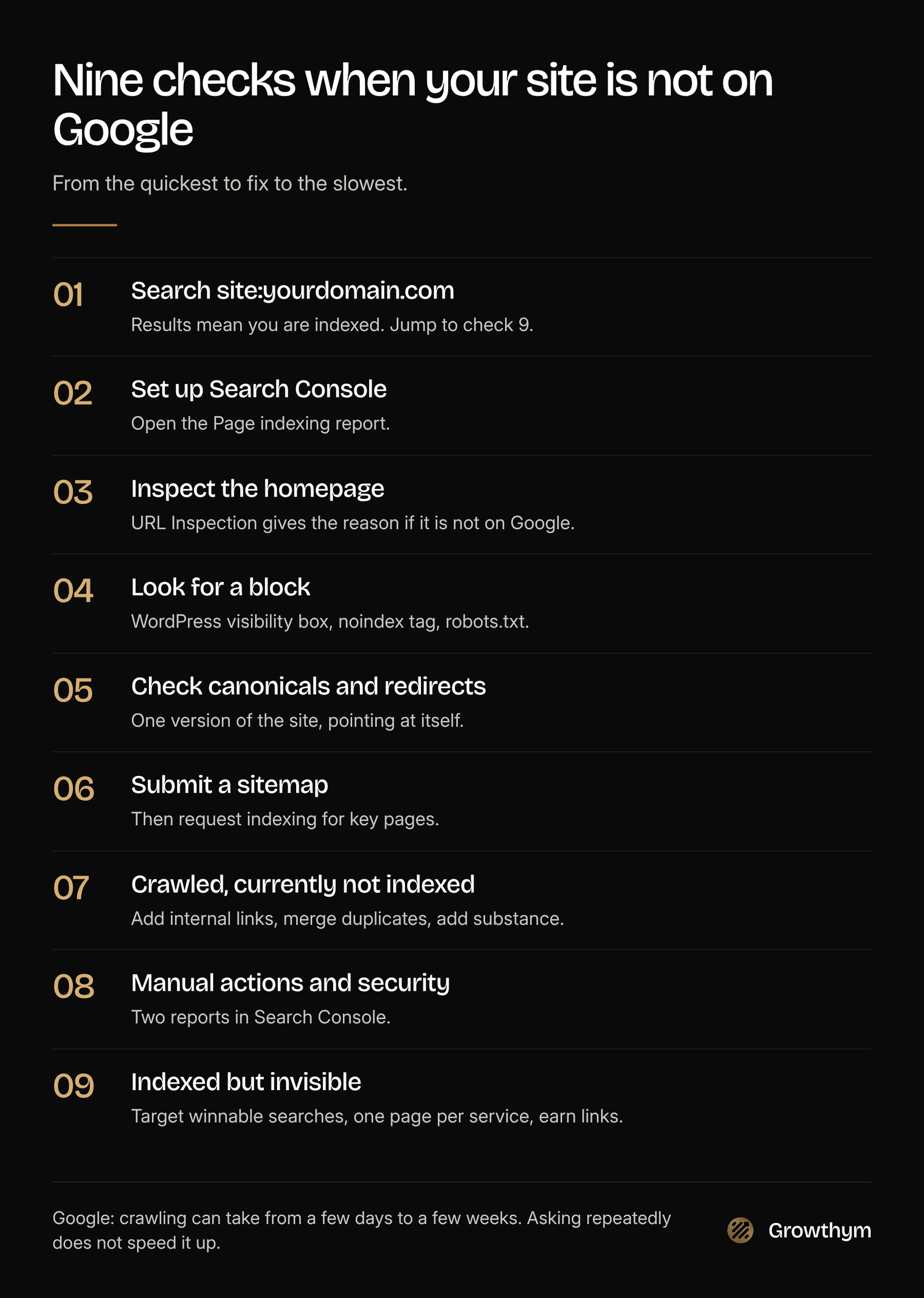
The nine checks below run from the quickest to the slowest to fix. Most sites find the problem by check five.
First, work out which problem you have
| What you see | Likely cause | Go to |
|---|---|---|
| Nothing appears, even for your exact domain name | Not found or blocked | Checks 1 to 6 |
| The homepage appears, most other pages do not | Crawled or discovered but not indexed | Check 7 |
| The site used to appear and has vanished | A block added by mistake, or a manual action | Checks 4 and 8 |
| Appears for your brand name, not for your services | Indexed but not ranking | Check 9 |
The nine checks, in order
Run them from the top. Each one either clears a cause or tells you where to look next.
Check 1: search site:yourdomain.com
Type site:yourdomain.com into Google. The site: operator lists pages Google holds from that domain. If you see results, the site is indexed and your problem is ranking, so skip to check 9. If you see none, carry on.
Check 2: set up Google Search Console
Search Console is Google’s free tool for site owners, and it is the only place that tells you what Google itself thinks of your pages. Add your site, verify ownership through your domain provider or your website platform, and wait a day or two for data to appear.
Open the Page indexing report. It shows how many pages are indexed, how many are not, and the reason for each group.
Check 3: inspect your homepage
Paste your homepage address into the URL Inspection tool at the top of Search Console. You will get one of two answers. “URL is on Google” means it is indexed. “URL is not on Google” comes with a reason, and that reason points you to one of the next checks.
Check 4: look for a block
Three settings can tell Google to stay away. All three are often switched on while a site is being built and then forgotten.
- The WordPress visibility setting. Under Settings, then Reading, there is a box labelled “Discourage search engines from indexing this site”. If it is ticked, untick it.
- A noindex tag. View the page source and search for the word noindex. A noindex rule removes the page from Google entirely. SEO plugins set this per page, so check your important pages one at a time.
- robots.txt. Open yourdomain.com/robots.txt. A line reading “Disallow: /” under “User-agent: *” blocks the whole site from being crawled.
If your site runs behind a security service or a CDN, also check that it is not challenging Googlebot with a bot check.
Check 5: canonical tags and redirects
A canonical tag tells Google which version of a page is the main one. If your pages point their canonical at a different address, such as an old domain or a staging site, Google will index that address and ignore yours. In URL Inspection, compare “User-declared canonical” with “Google-selected canonical”.
Then type your address four ways: with and without www, with http and with https. All four should land on a single version. If two versions load separately, Google sees two competing sites.
Check 6: submit a sitemap
A sitemap is a file that lists your pages. Most platforms and SEO plugins create one at yourdomain.com/sitemap.xml or /sitemap_index.xml. Submit that address under Sitemaps in Search Console. It does not force indexing, but it makes sure Google knows every page exists.
For a brand-new site, also ask for a crawl. In URL Inspection, press “Request indexing” on your homepage and your main service pages. Google says crawling can take from a few days to a few weeks, and that asking repeatedly does not speed it up.
Check 7: “Crawled, currently not indexed”
This is the status that confuses people most. It means Google visited the page, read it and decided not to keep it. “Discovered, currently not indexed” is its cousin: Google knows the address and has not got round to crawling it. Neither is an error you can fix with a button. Both are a judgment about whether the page is worth it.
We had this problem at scale. In November 2026, Search Console listed 171 known pages on growthym.com. Only 89 were indexed. Of the 82 that were not, 37 were marked “crawled, currently not indexed” and 18 “discovered, currently not indexed”. When we crawled the site ourselves, the cause was plain: 32 pages had no internal link pointing to them, and several articles covered almost the same topic.
The fixes, in the order we applied them:
- Link to the page from other pages. Google’s guidance says every page you care about should have a link from at least one other page on your site. A page nothing links to looks unimportant.
- Merge near-duplicates. Two thin articles on one topic become one strong article, with the weaker address redirected to it.
- Add what is missing. A page of 300 generic words rarely earns a place. Add specifics: prices, steps, examples, your own data.
- Remove what does not deserve to exist. Tag pages, empty category pages and test pages should be set to noindex or deleted so they stop diluting the rest.
Then request indexing again and allow a few weeks.
Check 8: manual actions and security issues
In Search Console, open “Manual actions” and “Security issues” in the left menu. A manual action means a Google reviewer found a breach of its spam policies, such as paid links or copied content. A security issue means the site has been hacked or is serving malware. Either can remove a site from results overnight. Both pages explain what was found and how to request a review once it is fixed.
Check 9: indexed but invisible
If the site: search shows your pages and you still cannot find yourself, the site is indexed and ranking low. Indexing is permission to compete. It is not a position.
This is the normal state for most pages on the web. An Ahrefs study of its index found that 96.55% of pages get no traffic from Google at all. Getting out of that group takes three things:
- Target searches you can win. Search your term and look at who ranks. If page one is national brands, choose a narrower version with your city or your specialism in it.
- Give each service its own page that answers the search directly, with proof and a price signal.
- Earn links and mentions from other sites in your field, starting with directories, associations and partners.
For a local business, a complete Google Business Profile will usually get you seen before your website ranks. Our local SEO checklist covers that. For a plan to turn visibility into enquiries, see organic lead generation.
Still stuck? Send us your domain. We will look at how Google sees it and tell you which of these nine checks is the one holding you back.
How long each fix takes to show
| Fix | Your effort | Time for Google to reflect it |
|---|---|---|
| Remove a noindex tag or robots.txt block | Minutes | Days to a few weeks |
| Correct canonicals and redirects | An hour or two | One to four weeks |
| Submit a sitemap and request indexing | Minutes | Days to a few weeks |
| Add internal links and merge duplicates | A few days | Two to eight weeks |
| Recover from a manual action | Days to weeks | After Google’s review, which can take weeks |
| Move from indexed to ranking | Ongoing | Months |
These are working ranges. Google gives no fixed timeline for any of them.
Three cases that catch new sites
The site is only a few days old. Google’s SEO Starter Guide says changes can take from a few hours to several months to be reflected, and suggests waiting a few weeks before judging. If you launched last week and nothing is blocked, wait.
The content is drawn by JavaScript. Some site builders load text only after scripts run. If URL Inspection’s “View crawled page” shows an almost empty page, Google is not seeing your content.
The site was copied from a template with its demo pages left in. Dozens of placeholder pages tell Google the site is low quality. Delete them.
Once Google can see you, the next question is whether AI assistants can. That is covered in GEO vs SEO. Technical fixes like the ones on this page are part of our SEO services, within organic growth marketing.
Frequently asked questions
How long does a new website take to show on Google?
Usually a few days to a few weeks after Google first discovers it. Submitting a sitemap and requesting indexing in Search Console helps Google find it sooner. Appearing for competitive searches takes months longer.
Why does my site show for my brand name but not for my services?
Your site is indexed but not yet ranking for those searches. Few other sites compete for your name, while many compete for your service. Build a dedicated page for each service and target narrower, local versions of the search first.
Does it cost money to appear on Google?
No. Google does not charge to include a site in organic results and does not accept payment to rank a page higher. Google Ads is a separate, paid system and its results are marked as sponsored.
Why did my website suddenly disappear from Google?
The common causes are a noindex tag or robots.txt block added during an update, a failed migration or domain change, a long hosting outage, or a manual action. Check the Page indexing and Manual actions reports in Search Console first.
Do I need to submit every page to Google?
No. Submit a sitemap once and link your pages to each other. Google follows links to find the rest. Use Request indexing only for the new or changed pages that matter most.
Request the audit