
An ecommerce SEO checklist has six parts: control over what Google crawls and indexes, category pages built around how people search, product pages with unique content and structured data, site speed, internal linking, and content that answers questions before purchase. For most D2C stores, index control and category pages move revenue first.
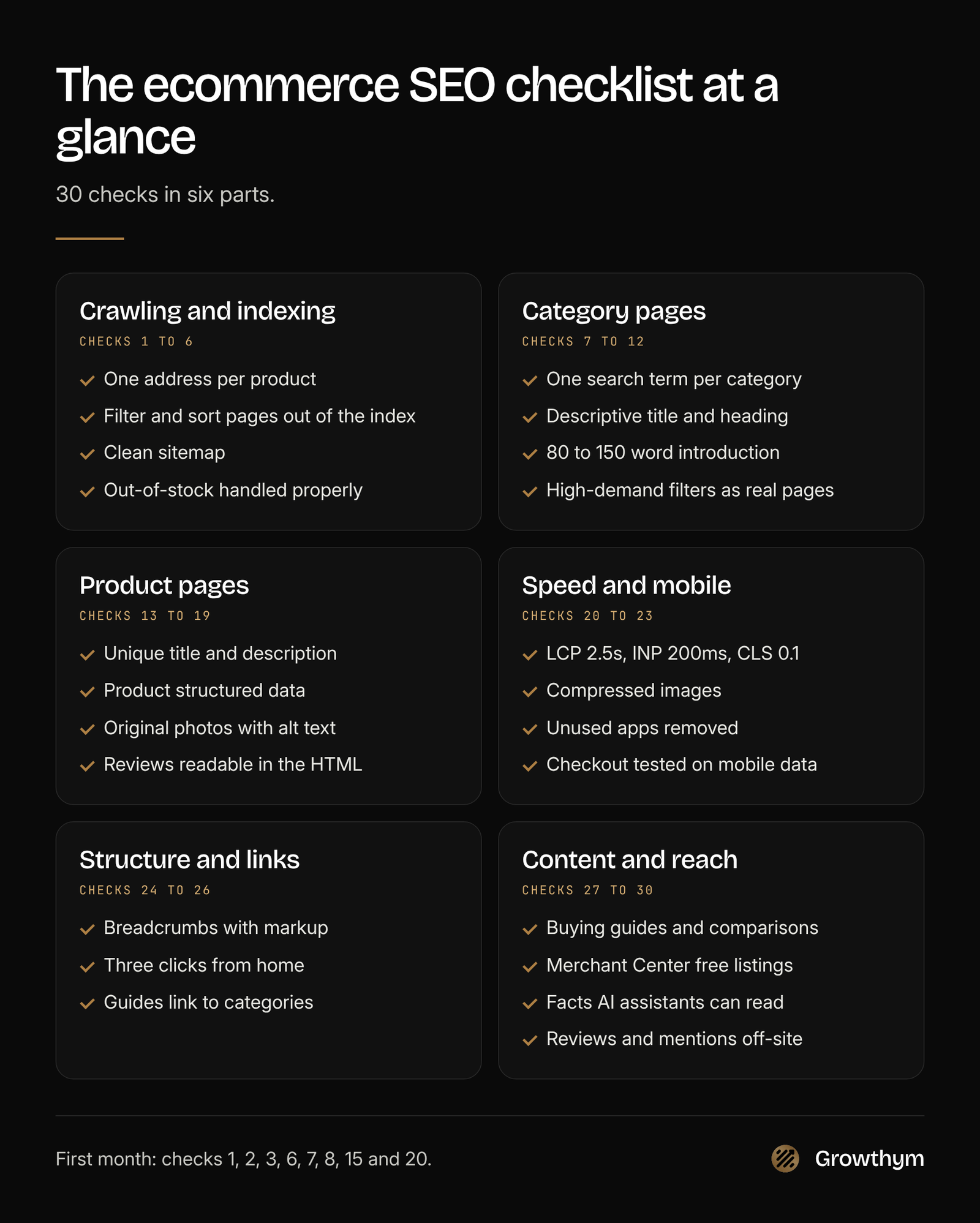
This checklist has 30 checks, grouped so you can hand each group to the right person. It is written for D2C brands on Shopify, WooCommerce or a custom build. If you are short of time, the priority order near the end tells you which eight to do first.
Why ecommerce SEO is a different job
A service website has twenty pages. A store with 400 products, six filters and three sort orders can generate tens of thousands of addresses, most of them near-copies of each other. Google has to choose which to index, and when it faces a pile of duplicates it often chooses badly or gives up early.
We have seen how quickly this goes wrong even on a small site. In November 2026, Search Console reported that only 89 of the 171 known pages on our own website were indexed. A store multiplies that problem by every filter it offers. So the first third of this checklist is about deciding what Google should see.
Part A: Crawling and indexing (checks 1 to 6)
- One address per product. If a product can be reached through several collections, every version must carry a canonical tag pointing to one main address. Google’s guide to URL structure for ecommerce sites covers variants and parameters.
- Keep filter and sort pages out of the index. Addresses created by colour, size, price and sort options should be canonicalised to the main category or blocked from crawling. Open a category, apply two filters and check what the canonical tag says.
- Clean the sitemap. It should list only pages you want indexed: live products, categories and content. No filtered addresses, no redirected or deleted pages.
- Handle out-of-stock products properly. Temporarily out of stock: keep the page live, mark availability and offer a back-in-stock alert. Gone for good: redirect to the closest product or category.
- Make pagination crawlable. Page 2 and beyond of a category should be reachable through normal links. Google’s pagination guidance explains why “load more” buttons alone can hide products.
- One version of the site. The http, https, www and non-www versions must all redirect to one.
Part B: Category pages (checks 7 to 12)
Category pages match how shoppers search before they know the exact product: “cotton kurta sets for women”, “gaming chair under 15000”. They are usually your highest-value pages and the most neglected.
- Assign one main search term to each category, and make sure no two categories chase the same one.
- Write a descriptive title tag and main heading, such as “Men’s Running Shoes” and not “Collection 4”.
- Add a short, useful introduction of 80 to 150 words: what is in the range, who it suits, how to choose. Place longer buying advice below the product grid.
- Link to subcategories with plain text links near the top.
- Turn high-demand filters into real pages. If many people search “black leather office chair”, build that as a proper indexable category with its own title and text.
- Add four to six FAQs on sizing, materials, delivery and returns for that range.
Part C: Product pages (checks 13 to 19)
- Write a unique title with brand, product type and the main attribute.
- Write your own description. Text copied from the manufacturer appears on every other retailer’s site. Say who the product is for, what it is like in use, and what it does not do.
- Add Product structured data with price, currency, availability and review ratings. This makes the page eligible for price and rating details in results.
- Include shipping and return details in the markup. Google’s merchant listing guidelines support both.
- Use original photographs with descriptive file names and alt text, compressed and served in a modern format.
- Show reviews on the page as text Google can read, not only inside a widget that loads afterwards.
- Link to related products and back to the parent category.
Part D: Speed and mobile (checks 20 to 23)
Google measures page experience through three Core Web Vitals. The thresholds for a “good” rating are:
| Metric | What it measures | Good |
|---|---|---|
| Largest Contentful Paint (LCP) | How fast the main content appears | 2.5 seconds or less |
| Interaction to Next Paint (INP) | How fast the page responds to a tap | 200 milliseconds or less |
| Cumulative Layout Shift (CLS) | How much the layout jumps while loading | 0.1 or less |
- Test your top category and product templates in PageSpeed Insights on mobile, and fix the template, since one fix covers every page built from it.
- Compress and size images. The hero image on a product page is usually the LCP element.
- Remove apps and scripts you no longer use. Each chat widget, review app and tracking pixel adds load time. Audit them every quarter.
- Walk through checkout on a mid-range phone on mobile data. Baymard Institute puts the average cart abandonment rate at about 70%. Rankings are wasted if the last step is slow or confusing.
Part E: Structure and internal links (checks 24 to 26)
- Add breadcrumbs to every product and category page, with breadcrumb structured data.
- Keep every product within three clicks of the homepage.
- Link from content to commerce. Every guide and blog post should link to the categories and products it discusses, with descriptive link text. Google’s link guidance asks that every page you care about has at least one link from another page.
Part F: Content and reach (checks 27 to 30)
- Publish buying guides and comparisons for the questions shoppers ask before choosing: “which mattress firmness for back pain”, “air fryer vs OTG”.
- List products in Google Merchant Center. Free listings put your products in the Shopping tab and other Google surfaces at no cost per click.
- Make product facts easy for AI assistants to read. Shoppers now ask ChatGPT and Gemini for recommendations. Clear specifications, prices and reviews in plain text help you get named. See our ChatGPT SEO guide.
- Earn reviews and mentions off your site: marketplace reviews, creator content, gift guides and press.
Running a D2C store? We will check how many of your pages Google has indexed, which categories are missing and where filter pages are wasting crawl time.
Common issues by platform
| Platform | What to check first |
|---|---|
| Shopify | Products reachable under both /products/ and /collections/…/products/ addresses, so confirm canonicals point to /products/. Tag pages creating thin duplicates. App scripts slowing every page. |
| WooCommerce | Attribute and tag archives indexed by default. Filter plugins creating crawlable parameter addresses. Hosting speed under load. |
| Custom build | Content rendered only by JavaScript. Missing canonical tags. Sitemap not updated when products change. |
Mistakes that cost stores the most
- Deleting products when stock runs out. Every deleted address that had links or rankings becomes an error page. Redirect or keep it.
- Changing URLs during a redesign without redirects. A migration with no redirect map can erase years of rankings in a week.
- Manufacturer descriptions on every product. Google has no reason to rank your copy of text that fifty other stores also show.
- Category pages with no text at all. A grid of thumbnails gives a search engine very little to understand.
- Writing blog posts that link nowhere. An article that attracts readers and never points to a category earns nothing.
- Measuring traffic and not revenue. Report organic revenue by landing page so you can see which pages pay.
The order to do it in
You do not need all 30 checks in the first month. Start with the eight that affect the most pages.
| Week | Checks | Why first |
|---|---|---|
| 1 | 1, 2, 3 and 6 | Stops Google wasting its crawl on duplicates |
| 2 | 7 and 8 | Points each category at a search people make |
| 3 | 15 | One template change adds rich details to every product |
| 4 | 20 | One template fix speeds up every page of that type |
| Months 2 and 3 | The rest, category by category, starting with your best sellers | Depth where the revenue is |
How to tell it is working
- Indexed pages in Search Console move closer to the number of products and categories you actually have.
- Impressions and clicks on category pages rise for non-brand searches.
- Organic revenue by landing page in GA4 shows categories, not only the homepage.
- Product results show price and rating in Google.
Expect the indexing changes to show within weeks and revenue to follow over three to six months. If you need sales sooner, read SEO vs Google Ads for how to run both, and SEO cost in India for what the work costs.
We run ecommerce SEO as part of our SEO services for D2C and consumer brands, within one organic growth programme.
Frequently asked questions
How long does ecommerce SEO take?
Indexing and structured data changes can show within weeks. Growth in category rankings and organic revenue typically takes three to six months, and longer in competitive product types. Start with template-level fixes because they affect every page at once.
Is Shopify good for SEO?
Yes, for most stores. It handles sitemaps, canonical tags and secure hosting by default. Its limits are a fixed URL structure, duplicate product paths through collections and speed loss from apps. All three are manageable with the checks above.
Should I delete out-of-stock product pages?
Not if the product is coming back. Keep the page live, show that it is out of stock and offer an alert. If it is discontinued, redirect the address to the closest alternative so links and rankings pass on.
Do product reviews help SEO?
Yes. Reviews add unique text to product pages, can show star ratings in results through structured data, and are among the facts AI assistants quote. Make sure the review text is in the page HTML and not only inside a script.
How many words should a category page have?
There is no required length. A useful introduction of 80 to 150 words above the products, plus buying advice and FAQs below, is enough for most ranges. Write what helps a shopper choose and stop there.
Do I need a blog for an ecommerce store?
You need content that answers pre-purchase questions: guides, comparisons and care instructions. Whether it lives in a blog or a guides section matters less than whether each piece links to the relevant category and products.
What is the most common ecommerce SEO mistake?
Letting filter, sort and tag pages be indexed. They create thousands of near-duplicate addresses that dilute the pages you want ranked. Check a filtered category’s canonical tag and your Page indexing report before anything else.
Request the audit